Security procedures already existed in SharePoint, but employees needed to apply them during real, everyday work.
What I did
Built short procedural videos, scenario questions, and an SPI + Email Security Checklist, then deployed the course in Thinkific.
The result
Assigned to about 140 employees with 66% completion, plus positive feedback from the DPO and manager.
01
The Situation
Smart Clicks began with a request from the company’s Data Protection Officer (DPO) to convert existing IT and security guidance into an eLearning experience.
The source materials already lived in SharePoint: Secure File Sharing in Microsoft 365 and Handling Suspicious Emails in Outlook. These were existing procedures, not new guides.
The course was designed as optional learning for existing employees and part of onboarding for new hires, separate from the company’s Data Privacy compliance course. Executive feedback later added practical guidance on Handling Sensitive Personal Information (SPI) in Everyday Communications.
02
The Problem
The company already had security procedures. The challenge was making them accessible, understandable, and usable during actual workplace tasks.
The instructional problem
How can existing IT procedures become short, practical learning that helps employees apply the correct actions when handling files, suspicious emails, and sensitive information?
03
The Audience
Existing employees
Optional course, offered as an additional learning resource.
New hires
Part of onboarding, introducing practical security procedures early.
What learners needed to know
What to do when receiving a suspicious email, and how to report it.
What to do after reporting it.
How to securely share files.
What to consider before forwarding an email containing SPI.
How to protect SPI during everyday communication.
04
My Role
I handled the project end to end, from analyzing the IT guides to configuring the course in Thinkific and reviewing completion data.
Creating, recording, and animating procedural videos
Designing knowledge checks and scenario questions
Writing feedback
Developing the SPI + Email Security Checklist
Updating procedures to more efficient workflows
Building, uploading, and configuring in Thinkific
Supporting deployment and reviewing completion data
05
My Approach
01
Start with the existing procedures and identify essential actions and terminology.
02
Open each module with why the procedure matters to the learner’s work.
03
Create step-by-step procedural videos for each procedure in the two guides.
04
Use screenshots, animated mouse movements, voiceover, and on-screen text for key information.
05
Update procedures where the current platform offers a faster, more efficient workflow.
06
Provide the SPI + Email Security Checklist as point-of-work performance support.
07
Adapt assessment to the LMS: recall and scenario-based MCQs with feedback.
08
Upload and configure in Thinkific, and promote it through a SharePoint digest.
06
Design Decisions
Teach procedures, not just concepts
What I chose: Focus on the actions employees need to perform.
Why: The sources were procedural guides and the intended outcome was appropriate workplace behavior.
Start each module with relevance
What I chose: Explain why the procedure matters before presenting the steps.
Why: Context beats a sequence of instructions with no apparent relevance.
Short procedural videos
What I chose: About three minutes per video, following the training team’s guideline.
Why: Short videos keep each procedure focused and manageable.
Demonstrate every action
What I chose: Screenshots, animated mouse movements, voiceover, and on-screen text.
Why: Learners see and hear the sequence instead of interpreting written steps alone.
Update, don't just reproduce
What I chose: Revise procedures when the current platform offers a faster approach.
Why: The goal is correct, efficient performance, not preserving the original document.
Add a job aid
What I chose: A downloadable SPI + Email Security Checklist.
Why: Employees shouldn’t need to revisit a finished course every time a situation comes up.
Adapting to the technology: the LMS didn’t support the hands-on simulation I wanted, so I used recall and scenario-based MCQs with feedback, preserving an opportunity to assess decision-making.
Decisions in practice
Demonstrating every action. A short procedural video using screenshots, animated mouse movements, voiceover, and on-screen text.
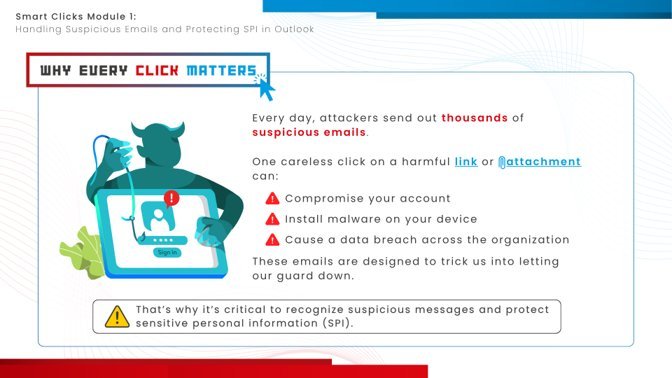
Starting with relevance. Module 1 opens by explaining why every click matters before teaching the procedure.
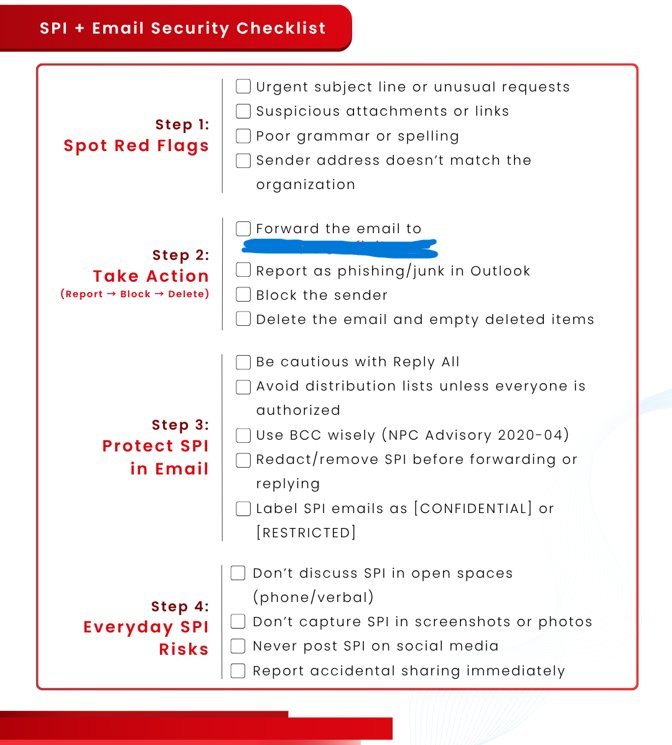
The job aid. The downloadable SPI + Email Security Checklist gives employees support at the moment of need.
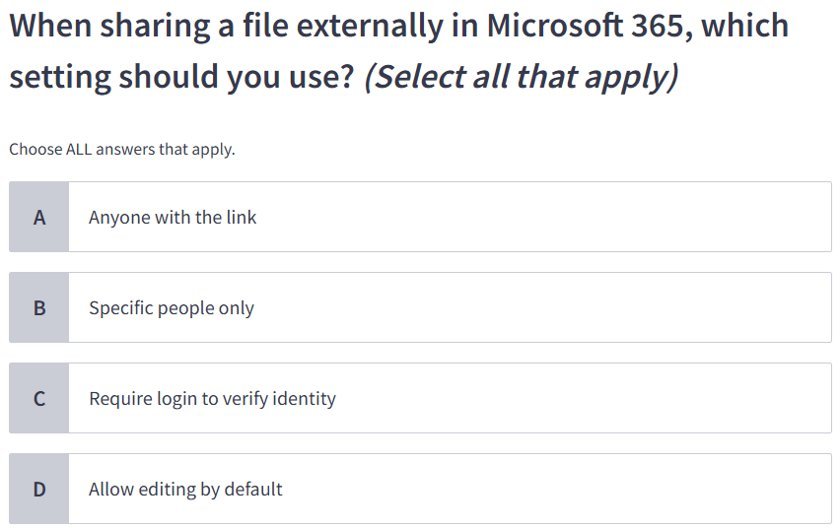
Assessment adapted to the LMS. Scenario-based multiple-choice questions stand in for the hands-on simulation the platform couldn’t support.
07
Outcome
The course was implemented in Thinkific and assigned to approximately 140 employees, with a 66% completion rate recorded. The Data Protection Officer and manager gave positive feedback during review.
The 66% figure is implementation evidence, not proof of learning effectiveness or behavior change. Smart Clicks was optional for existing employees and part of onboarding for new hires, which matters when interpreting completion. There is not yet evidence measuring changes in on-the-job performance or security incidents.
08
Reflection
What worked
The focus on practical workplace behavior. Procedural videos showed the actual steps, and the job aid extended the learning beyond the course.
What was challenging
The LMS’s assessment limits. Ideally learners would perform the procedures hands-on, but the platform only supported multiple-choice questions.
What I learned
Learning doesn’t have to end when the course does. For procedures, a job aid supports people at the moment of need better than revisiting a finished course.